Auditing Open Government Data Assets
This chapter outlines a reproducible process for auditing metadata and dataset changes of an agency’s Data.gov harvest source and/or its comprehensive data inventory and individual data files. Additionally, non-inventoried information collection requests (IRCs) subject to the Paperwork Reduction Act (PRA) processes are also considered. The process makes use of several external resources, especially the Internet Archive’s Wayback Machine (WBM) to (re)establish historical baselines should they not exist. The workflow relies on a set of convenience functions written in python that provides an audit package for federal open government data (mainly, datagov-audit.py and the pra-icr-tools package).
The entire workflow is described by the diagram, which outlines a temporal system designed to track changes to open government data. The workflow begins by establishing a baseline, referred to as T0, and comparing it against subsequent monitoring runs, or Tn, to detect content drift, link rot, metadata alterations, and availability issues. The workflow pulls metadata references from Data.gov, the specific agency’s inventory, and (optionally) from the WBM. Nodes in the diagram prefixed with “CLI” (short for command-line interface) indicate specific helper functions provided by datagov-audit.py; for example, the workflow’s list-harvest node is executed by the list-harvest CLI to enumerate active Data.gov streams. Similarly, the snapshot-org node utilizes the snapshot-org CLI to capture the raw Data.gov catalog of a specific agency, while the fetch-datajson node relies on the fetch-datajson CLI to download harvest sources from an agency. More details about Data.gov, including its limitations for monitoring changes to underlying datasets, are described in the chapter on the Federal Data Catalog (FDC). Parts of this this workflow is similar to that used by Freilich & Kesselheim (Data Manipulation within the US Federal Government, 2025) in their forensic study of HHS data and metadata in early 2025.
 Figure: Workflow for Auditing Open Government Data Assets and Information Collections
When monitoring specific data distributions, such as CSV or JSON files, the workflow leverages the WBM to capture historical snapshots of the dataset’s state. To determine if data available for download from an agency at a specific moment in time has drifted from this archived version, the compare-wayback node provides comparative statistics and information. Based on the file type detected, this step automatically evaluates the data for modifications using file size, SHA-256 hashes, and other structural differences. The function does not evaluate specific differences within a dataset per se, rather it simply evaluates whether differences exist between T0 and Tn instances.
Diff Engine and Related Subroutines
At the core of this monitoring system is the Diff Engine node, which is responsible for comparing the T0 baseline against the Tn run to quantify changes. For comparing Data.gov CKAN metadata over time, the workflow maps to the script’s diff CLI. Conversely, diffing the agency’s internal data.json files over time is handled by the diff-inventory CLI. The generation of human-readable dataset dossiers and change logs from these comparisons is managed by the inspect-diff CLI, which iterates through the diff engine’s output to reveal exact, field-level modifications.
Alongside the time-series Diff Engine, the workflow includes cross-check CLI, which compares two files from the exact same monitoring run (Tn): the agency’s live data.json and Data.gov’s live CKAN snapshot. By extracting and matching identifiers across the two different schemas, the cross-check CLI reports out whether the FDC has injested the current version of the agency harvest source. This report feeds directly into the final outputs, revealing datasets the agency published but Data.gov failed to harvest. Ghost records lingering on Data.gov that the agency has already removed are also returned in this step (such as was the case for several months with more than 2000 datasets previously provided by the United States Agency for International Development).
FDC Harvest Sources
Data.gov harvests metadata that it populates in to the Federal Data Catalog across multiple sources at federal, state, and local agencies websites. Data.gov reports the list of all sources at: https://catalog.data.gov/harvest. According to the WBM snapshot of January 15, 2025, which is closest snapshot immediately prior to the 2025 inauguration, there were 916 harvest sources available. As of 1/23/2026, there were 919.
The number of harvest sources can change on Data.gov for a few reasons. Harvest sources are sometimes combined or disaggregated and they can change formats (some harvest sources were updated in the last few years to be provided through an API for example) and are subject to outages like any other online resource.
Despite guidance from OMB and Congress that agencies are supposed to have a single comprehensive data inventory (CDI) made publicly available at agency.gov/data.json, which would serve as the harvest source for the Federal Data Catalog, many agencies have more than one source of harvest data due to the real-world complexities of managing a multiple information systems within agencies. The U.S. Census Bureau, for example, has 659 sources as of 1/23/2026, representing 70% of all the harvest sources used by Data.gov.
Historical data on the number of harvest sources can be obtained through WBM snapshots of https://catalog.data.gov/harvest/, a time-series of which is provided in the project data repository file: datagov_harvest_counts-01282026.csv. The auditing workflow described here considers the general case of agency supplied harvest sources whether they represent a single CDI or are a collection of multiple inventories.
List of all datasets in the FDC
The Diff Engine node can take various, general, methods for comparing files. One useful purpose is to use the Diff Engine to evaluate changes to the total list of datasets indexed in the FDC. This requires an inventory as input at T0, which can be obtained through Data.gov’s flexible CKAN API.
To generate a JSON object of all available (non-collection) datasets indexed in the Federal Data Catalog, the CKAN API has the following public baseurl:
https://catalog.data.gov/api/3/action/package_search
Alternatively, an API key can be requested from GSA and can be used with the following baseurl:
https://api.gsa.gov/technology/datagov/v3/action/package_search?api_key=API_KEY
Through either access point, the total number of assets is returned in the count element the top of the call:
{
  "help": "https://catalog.data.gov/api/3/action/name=package_search",
  "success": true,
  "result": {
    "count": 391082,
    "facets": {

    },
	...
}
Now, as documented on the Data.gov user-guide, the collections of datasets are counted as a single dataset. This means that the total count displayed on the landing page, along with the figure returned in the count element above, is a significant undercount. The total number of collections can be found by counting up the datasets with field name “collection_package_id” present using the following API call:
https://catalog.data.gov/api/3/action/package_search?fq=collection_package_id:*&rows=0
which (as of 1/24/2026) returns:
{
  "help": "https://catalog.data.gov/api/3/action/help_show?name=package_search",
  "success": true,
  "result": {
    "count": 113495,
    "facets": {

    },
    "results": [],
    "sort": "views_recent desc",
    "search_facets": {

    }
  }
}
Adding the two numbers together provides the total number of datasets (at around the end of January 2026) of: 504,577. This value reflects the total, including non-federal data assets indexed by Data.gov. On January 23, 2026, GSA published a beta-version of the next iteration of the FDC at: https://beta-catalog.data.gov. In this version, each dataset contained within a collection is counted separately, reflecting a more accurate representation of the true number of data assets in the FDC. Of note, the calculation conducted here and the new beta-version of the FDC agree, sans a few hundred datasets. These statistics can also be recovered visually from the summary statistic graphs Data.gov website as evident in the screenshot compilation represented by the figure below:
By default the dataset results are limited to the first 20 responses of the API call (which can be increased to 1000 per ‘page’ using the API with a registered key). Two additional stand-alone scripts can be used to collect a complete inventory of all data assets indexed in Data.gov: resume-data.catalog.py for datasets not in a collection and resume-datagov-collections.py for datasets in a collection. These python scripts iterate through all results gracefully and handle interruption and have pause/resume capability. Both functions output a csv file that can then be concatenated together. For an auditing run done for this project, the output files are both available via the GitHub Large File Storage system in the project data repository: datagov_inventory-01232026.csv and [datagov_collections_inventory-01252026.csv] (https://www.github.com/cmarcum/data-integrity/tree/main/data/datagov_collections_inventory-01252026.csv), respectively.
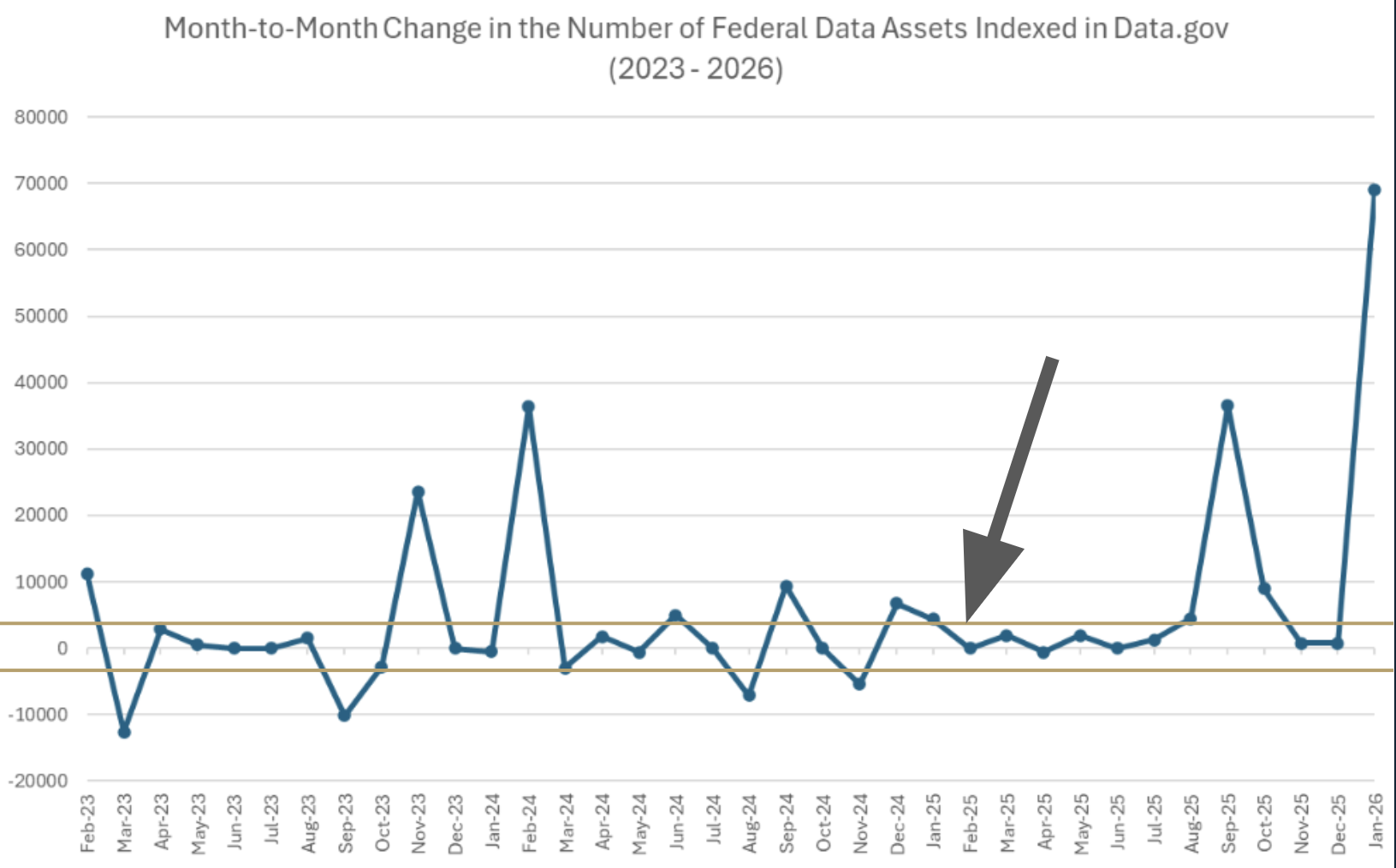 Figure: Month-to-Month Change in the Number of Federal Data Assets Indexed in Data.gov (2023 - 2026) with +/- 3000 lines to provide visual context to the magnitude of changes between January 2025 and February 2025 reported in the press (see arrow). Data were collected from WBM snapshots of Data.gov and are provided in the project data repository file: datagov_collection_count-01262026.csv. The first successful WBM snapshot of Data.gov occurring each month between January 2023 and December 2025 (inclusive) were visited and the total number of datasets was recorded manually from information available in the static page. A major update to the format, layout, and presentation of information occurred in early March of 2023, which added a new presentation of metrics and statistics directly on the landing page, including statistics that disaggregate the number of datasets by source type. For snapshots visited prior to this change, corresponding snapshots of catalog.data.gov/dataset were also visited to collect the number of federal datasets indexed by Data.gov.
Using the WBM with the FDC and CDIs
Because the WBM does not take snapshots of the API URLs with much regularity, it is not a reliable source of status changes to the FDC via that route. There were just two snapshots of the API baseline URL in 2025 and the closest snapshot taken prior to the 2025 inauguration was done on 6/28/2024.
Instead, historical data on the number of reported datasets indexed into the FDC should be collected by scraping WBM snapshots of the relevant Data.gov pages (and the underlying source code). The WBM’s CDX API provides a convenient way to access snapshots that were crawled and stored by the Internet Archive in the past. For instance, the following API call collects the snapshot timestamps from January 1st, 2023 to December 31st, 2025 and returns the result as a json object:
https://web.archive.org/cdx/search/cdx?url=data.gov&from=20230101&to=20251231&collapse=timestamp:6&output=json&fl=timestamp,original
The associated CLI auditing scripts handle the fetching in python to write out a csv file containing each snapshot’s WBM URL, basically like this:
import requests

url = "https://web.archive.org/cdx/search/cdx?url=data.gov&from=20230101&to=20251231&collapse=timestamp:6&output=json&fl=timestamp,original"
data = requests.get(url).json()

with open("snapshots.csv", "w") as f:
    for row in data[1:]:
        f.write(f"http://web.archive.org/web/{row[0]}/{row[1]}\n")
For one auditing run, the resulting list of URLs was saved in snapshots_datagov-01012026.csv.
From the April 2023 to the December 2025 snapshots, the number of datasets can be extract from the snapshot html. Presumably, this will work on contemporaneous (live) versions of data.gov, assuming that GSA does not make updates to the landing page structure after the date of publication of this project:
import csv, requests, re
from bs4 import BeautifulSoup

# Input: 'urls.csv' (URLs in first column) | Output: 'results.csv'
with open('urls.csv', 'r') as f_in, open('results.csv', 'w', newline='') as f_out:
    writer = csv.writer(f_out)
    for row in csv.reader(f_in):
        try:
            html = requests.get(row[0], headers={'User-Agent': 'Mozilla/5.0'}).text
            text = BeautifulSoup(html, 'html.parser').find('div', class_='hero__dataset-count').get_text()
            count = re.search(r'([\d,]+)', text).group(1).replace(',', '')
            writer.writerow([row[0], count])
        except:
            pass
Agency Comprehensive data inventory differencing
Individual agency CDIs, usually stored as json files on agency websites, are not archived with much regularity by the WBM. The WBM snapshots also inject noise into the json files because its archiving routines attempt to automagically add the snapshot’s WBM URL prefix to each link in the file, even if the endpoints of those URLs do not lead to pages that were part of the snapshot. For example, a recent snapshot of EPA’s comprehensive data inventory by the WBM is available here (taken on August 7th, 2025 at 5:34pm GMT):[https://web.archive.org/web/20240807053438/https://pasteur.epa.gov/metadata.json] (https://web.archive.org/web/20240807053438/https://pasteur.epa.gov/metadata.json) . The prefixing issue is apparent in many of the accessURL (the DCAT-US endpoint for where data can be accessed from) for the datasets even when those datasets are stored outside of EPA’s own server. For instance, “The Social Cost of Ozone-Related Mortality Impacts From Methane Emissions - Associated Model Data and Code” dataset is stored on Zenodo, where it can be associated with related publications and other derivatives. The URL in the WBM archive, however, points to https://web.archive.org/web/20240807053438/https://doi.org/10.5281/zenodo.8276748 not the correct record at https://doi.org/10.5281/zenodo.8276748.
To resolve this issue, any archived json files acquired from the WBM for auditing purposes should be modified using a simple regular expression that searches for “https://web.archive.org/web/[PREFIX]/” (where [PREFIX] references the WBM prefix associated with a specific snapshot) and replaces it with an empty string. This enables direct comparison between WBM archived versions of the json files and between a WBM archived version and the live version of the json files.
Monitoring Changes to Information Collection Requests
Finally, in addition to direct monitoring of open government data assets from the FDC and CDIs, the workflow incorporates an Information Collection Request (ICR) subroutine. This component acts as a fallback when the underlying datasets associated with federal collections are not properly indexed or published within an agency’s CDI. To monitor these changes independently of the agency catalogs, the workflow utilizes external resources like dataindex.us and the pra-icr-tools package. By pulling Paperwork Reduction Act (PRA) XML reports, CSV exports, and collection documents, this subroutine normalizes and stores ICR tables during each monitoring run. It then maps these collections back to specific datasets using metadata keywords, documentation, or OMB Control Numbers.
What the routine misses
The auditing routine relies on catalogs of information related to federal data assets, including the Federal Data Catalog provided by Data.gov, agency comprehensive data inventories, and the inventory of information collection requests provided by reginfo.gov (or alternatively by dataindex.us). The workflow does not consider, however, non-inventoried sets of data that may be available to the public on discrete agency websites. For instance, the non-inventoried data assets that are publicly accessible via download from the PEPVAR website would not be captured in the process. However, since the WBM crawls most publicly accessible federal websites, it should be possible to monitor tracking and changes using the WBM CLI tools/steps.
The workflow could be modified to accommodate these edge-cases by adding a sub-routine that:
- inputs a list of websites that have data assets available for download
- archives each website
- runs the Diff engine comparing each website to snapshots archived in the WBM
- captures each dataset available on each website and a snapshot from the WBM
- runs the Diff engine on each dataset available on each website comparing to the WBM snapshot versions
- updates the list and continues
EPA ScienceHub Data.gov Inventory Audit Workflow Example
To illustrate the workflow in action, consider the Environmental Protection Agency’s (EPA) ScienceHub, which supplies a data inventory .json file that is used by Data.gov as a harvest source. ScienceHub is the agency’s central catalog for research datasets, models, code, and other scientific products generated across its laboratories. It was built to make EPA science easier to find, reuse, and evaluate, drawing heavily on the work historically produced by the Office of Research and Development (ORD), which was the program that coordinated EPA’s research programs, maintained specialized labs, and ensured scientific rigor across environmental and public‑health studies.
That foundation was disrupted when the Trump administration eliminated ORD in 2025, replacing it with a new structure and reducing the agency’s independent research capacity. Because ScienceHub depends on the continuity of EPA’s scientific programs, the loss of ORD introduced uncertainty about future dataset production, long‑term monitoring, and the stewardship of existing scientific resources, making it a good candidate for this exercise.
Step 0: Establish Baseline and Current Dates
Before pulling data, decide what you are comparing today’s data against (e.g., January 1, 2025 vs. Today).
| Condition | Action | Next Step in Workflow |
|---|---|---|
| Local Baseline Exists | You already saved a metadata.json file from the agency at a previous date. | Skip to Step 5 (use your local file as the old input). |
| No Local Baseline | You do not have historical files saved. | Proceed to Step 1, then extract a snapshot from the Internet Archive in Step 4. |
For completeness, this workflow assumes no local baseline files exist.
Step 1: Capture Current List of All Harvest Sources
Download a master list of everything Data.gov is currently configured to harvest to get a landscape view of active sources.
python datagov-audit.py list-harvest --out harvest_sources.json
The first few lines of the output of this command saved in harvest_sources.json will look similar to this:
head harvest_sources.json -n 9
[
  {

    "id": "cc7df4cc-8036-4868-b422-5823c63957d7",
    "title": "Exim Data.json",
    "source_url": "https://img.exim.gov/s3fs-public/dataset/vbhv-d8am/data.json",
    "frequency": "WEEKLY",
    "source_type": "datajson"
  },
This file is useful for other purposes as well, as it can be used to monitor the changes to the Data.gov harvest sources.
Step 2: Confirm the Source Exists
Search the master list you just downloaded to verify the EPA Pasteur metadata source is present and active on Data.gov. While this can be done using regular expressions, the datagov audit package provides a convenience function for this purpose with fuzzy-matching:
python datagov-audit.py find-datajson harvest_sources.json pasteur.epa.gov
Which find the harvest source for epa’s ScienceHub and reports the entry to the terminal:
[
  {
    "id": "04b59eaf-ae53-4066-93db-80f2ed0df446",
    "title": "EPA ScienceHub",
    "source_url": "https://pasteur.epa.gov/metadata.json",
    "frequency": "DAILY",
    "source_type": "datajson"
  }
]
Step 3: Grab Live Version of Harvest Source Data Inventory
Download and validate the current, live metadata inventory directly from the EPA. The datagov audit scripts provide a convience function for wrapping the CURL call to download the file from the agency website. This serves as the ‘current’ or ‘new’ file for comparison.
python datagov-audit.py fetch-datajson https://pasteur.epa.gov/metadata.json --out epa-pasteur-metadata.json
Step 4A: Find the Baseline Wayback Capture
Use the Internet Archive’s Wayback Machine CDX query tool to list captures from a specific target date (e.g., 01/01/2025) to capture a snapshot with a timestamp closest to your baseline date for comparison to the live version.
python datagov-audit.py wayback-cdx https://pasteur.epa.gov/metadata.json --from-ts 20250101 --fetch
The output will print options closest to the specified timestamp which can be used to locate the exact timestamp from the output (e.g., 20250105123000) for the next step.
Step 4B: Grab and Clean the Baseline Wayback Snapshot
Using the timestamp found in 4A, download the raw JSON from the Wayback Machine (using the id_ modifier) and clean it to strip out any Wayback-injected HTML or URL rewriting.
python datagov-audit.py clean-wayback "https://web.archive.org/web/20250105123000id_/https://pasteur.epa.gov/metadata.json" --out pasteur-wbm-20250105-metadata.json
Because WBM adds relay prefixes to URLs found in its snapshots that forward to other snapshots, this script automatically cleans them up so that comparisons with non-WBM snapshot equivalent files can be made.
Step 5: Compare WBM Baseline File to Current File
The datagov-audit script contains a useful differencing engine that can be used to compare the cleaned baseline against today’s live inventory. This generates a machine-readable JSON report of all added, removed, and modified datasets.
python datagov-audit.py diff-inventory pasteur-wbm-20250105-metadata.json epa-pasteur-metadata.json --out pasteur-compare-diff.json
In addition to a machine-readable json list of added, removed, and modified datasets, the function prints a high-level summary to the termina:
{
  "removed": 0,
  "added": 800,
  "modified": 29,
  "old_total": 3457,
  "new_total": 4257,
  "old_indexed": 3457,
  "new_indexed": 4257
}
Step 6: See Which Dataset Metadata Entries Were Modified
Convert the machine-readable JSON report into a human-readable text file that shows exactly which fields changed (e.g., description updates, modified dates, new contact emails) for every modified record.
python datagov-audit.py inspect-diff --report pasteur-compare-diff.json --out pasteur-changes.txt
In this case, inspecting the report reveals that the 29 modified metadata elements were mostly changed to update versions of files, new downloadURLs, or to remove the “Office of Research and Development” as the publishing office (see Step 9, below, for an example of five such cases).
Step 7: Evaluate Modification of a Specific Downloadable Dataset
Often, metadata changes alone are insufficient to reveal whether underlying data were also modified. The datagov-audit scripts can also do rough checks of whether the actual downloadable files (i.e., .zip, .csv, .json) were also modified since the baseline date (assuming that the WBM actually captured the file around that time). The script mathematically evaluates differences in the files using hashing (specifically, by using the SHA-256 algorithm to create a digital fingerprint of the files to compare).
As an example, we grab one of the files where the metadata had been modified. In this case, it’s the file associated with advanced septic systems pilot data: https://catalog.data.gov/dataset/performance-data-for-enhanced-innovative-alternative-i-a-septic-systems-for-nitrogen-remov.
python datagov-audit.py compare-wayback "https://pasteur.epa.gov/uploads/10.23719/1529539/V1%20data%20release.zip" --from-ts 20250101 --out dataset-diff.json
In this specific case, the underlying data have not been modified and the output clearly shows no changes in either the file sizes or the underlying structure per the hashing routine:
{
  "ok": true,
  "target_url": "https://pasteur.epa.gov/uploads/10.23719/1529539/V1%20data%20release.zip",
  "format": "bytes",
  "live": {
    "final_url": "https://pasteur.epa.gov/uploads/10.23719/1529539/V1%20data%20release.zip",
    "content_type": "application/zip",
    "bytes": 873201,
    "sha256": "d9772818ebeede03f4e099e5d3d6b47dcf3266640f9df369f2f36fb580b7c6e2"
  },
  "wayback": {
    "capture": {
      "timestamp": "20240621201154",
      "original": "https://pasteur.epa.gov/uploads/10.23719/1529539/V1%20data%20release.zip",
      "statuscode": "200",
      "mimetype": "application/zip",
      "digest": "BA7N5KHZEYODCVGQBLSP2P43QS5BADTV",
      "length": "838168"
    },
    "replay_url_raw": "https://web.archive.org/web/20240621201154id_/https://pasteur.epa.gov/uploads/10.23719/1529539/V1%20data%20release.zip",
    "bytes": 873201,
    "sha256": "d9772818ebeede03f4e099e5d3d6b47dcf3266640f9df369f2f36fb580b7c6e2"
  },
  "match": {
    "sha256_equal": true,
    "bytes_equal": true
  }
}
This routine could easily be extended to recursively iterate over a set of datasets. Of course, diligence to assess the fidelity of all federal data assets by a single entity would be infeasible but stakeholders with special interests in specific datasets could be done with some regularity.
Step 8: Verify Data.gov Ingestion
Finally, verify that Data.gov’s harvester has successfully ingested the agency’s updates into the public catalog.
python datagov-audit.py snapshot-source "04b59eaf-ae53-4066-93db-80f2ed0df446" --out datagov-pasteur-snapshot.json
Running this function periodically will provide a mechanism to establish new baselines directly from what Data.gov injests and uses in the Federal Data Catalog. Two such instances can be compared using the diff command, or they can be to ensure Data.gov stays in sync with the EPA’s live file.
Two such snapshots can also be compared using the diff-inventory and inspect-diff functions, but with minor argument changes to ensure the json field mappings are comparable:
python datagov-audit.py diff-inventory datagov-old-snapshot.json datagov-new-snapshot.json --dataset-key packages --id-field id --out ckan-diff.json

python datagov-audit.py inspect-diff --report ckan-diff.json --id-field id --out ckan-changes.txt
Step 9: Compare Federal Data Catalog with Agency Inventory
python datagov-audit.py cross-check epa-pasteur-metadata.json datagov-pasteur-snapshot.json --out cross-check-report.json
{
  "agency_total": 4257,
  "ckan_total": 4258,
  "missing_from_datagov": 0,
  "extra_on_datagov": 1,
  "common": 4257
}
In this case, one dataset appears in the FDC that is not in the agency inventory, and that’s because there was a one-day difference between the time the two files were downloaded (with the Data.gov version being more recent). That dataset was added on 3/2/2026: Assessing Flooding from Changes in Extreme Rainfall: Using the Design Rainfall Approach in Hydrologic Modeling. No datasets appear to be missing.
However, some changes did occur. A closer inspection by looking at the difference in the names of the data assets reveals that were five additional entries that appear in the WBM archive of the EPA comprehensive data inventory that do not appear in the version live as of 1/1/2025. These are:
- EnviroAtlas - 2010 Dasymetric Population for the Conterminous United States v3 (In Review)
- Chironomid nitrogen stable isotope data for NARS 2007, 2008, and 2009 surveys
- Performance data for enhanced Innovative/Alternative (I/A) septic systems for nitrogen removal installed in a field demonstration in Barnstable, Massachusetts (2021 - 2023)
- Convex Hulls for Species Richness and Invivudal Species
- Bioenergy Senario Model (BSM) data from Miller et al
None of these datasets appear to have been removed due to undue political interference. The first entry, referencing an in review version of EnviroAtlas, has been merged into the new “EnviroAtlas - 2010 Dasymetric Population for the Conterminous United States v3” dataset. The second entry, has also been merged with new data and combined added as new dataset: “Chironomid nitrogen stable isotope data for NARS 2007-2009, 2012-2014 surveys”. The third entry has been replaced with an updated dataset: “Performance data for enhanced Innovative/Alternative (I/A) septic systems for nitrogen removal installed in a field demonstration in Barnstable, Massachusetts (2021 - 2023). Version 2”. The fourth and fifth entries were removed and replaced to correct the typo in their respective title fields: “Convex Hulls for Species Richness and Individual Species” and “Bioenergy Scenario Model (BSM) data from Miller et al”.
Conclusion
This chapter provided a replicable workflow for auditing and evaluating the integrity of federal data, using the EPA’s ScienceHub repository as a practical example. By combining historical baselines from the Wayback Machine and contemporary and historical snapshots of agency files, with the automated comparative routines, independent monitors can effectively track data disruptions, detect silent metadata alterations, and verify catalog synchronization. The audit routine can be adapted for dataset-specific, agency-wide, or system-wide monitoring. While this specific example focused on the EPA, these methods are highly generalizable. The cross-schema checks, diffing engines, and hashing routines should operate on almost any JSON-based inventory.